
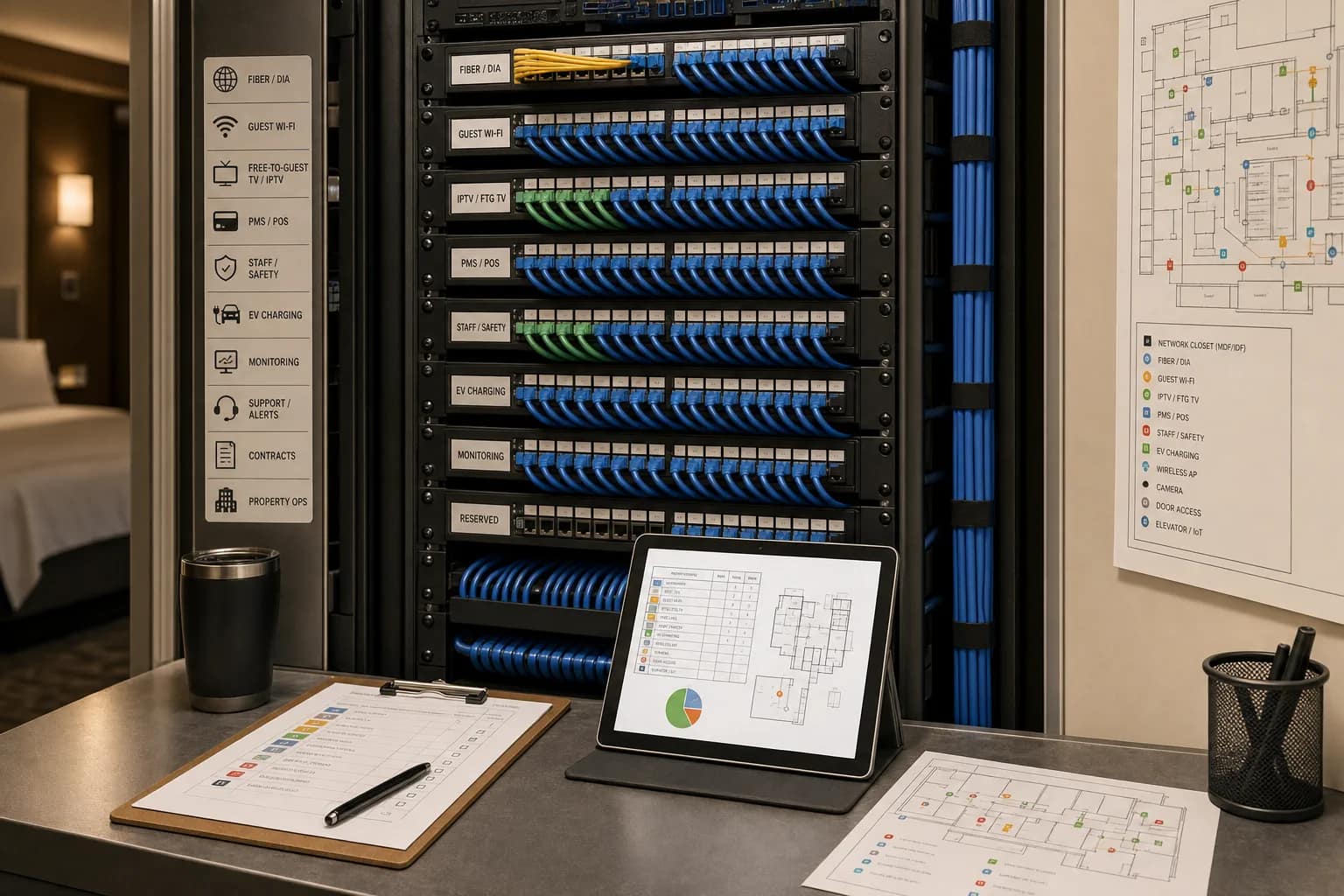
Short answer: good hotel network documentation saves hours because the next technician does not have to rediscover the building during an outage, renovation, vendor change, or brand punch-list call. A label on a cable is useful. A label that connects to a port-count sheet, floor plan, patch-panel port, closet, use case, and test result is much more useful.
That is the part hotel ownership teams often miss.
A clean rack looks better in a photo, but the real value is not the photo. The real value is that someone can walk into an MDF or IDF six months later and know what supports the guest Wi-Fi, what supports IPTV or Free-to-Guest TV, what feeds cameras, what supports phones, what touches POS or back-office systems, and what should not be unplugged just because the cable is in the way.
Labels save hours because they reduce guessing. In hotels, guessing is expensive.
Why Labels Matter More In Hotels Than In Ordinary Offices
Hotels are strange buildings from a technology standpoint. A single property can have guest rooms, public areas, meeting rooms, fitness areas, back office, front desk, security, food and beverage, ownership reporting, vendor portals, brand systems, payment systems, phones, IPTV, cameras, access points, thermostats, staff safety tools, EV chargers, and legacy services that nobody wants to touch until they have to.
All of that may pass through the same closets.
In recent hotel low-voltage project material we reviewed, the cabling scope was not a handful of drops. It included hundreds of Category 6 locations, guest-room drops, wireless access point locations, CCTV locations, phone-only locations, data-only locations, TV/public-area locations, fiber risers between MDF and IDF rooms, patch panels, racks, ladder rack, vertical cable managers, termination, testing, and closeout documentation.
That is why a label matters. The label is not there to impress another installer. It is there so the next person can answer one practical question quickly:
What does this cable support, and what happens if I move it?
The Label Is Only Half The Documentation
Tie labels and port records to an owner-side hotel network infrastructure plan so operations can trace each service from the carrier handoff to the guest or staff endpoint.
A label by itself is a clue. A documented label is a map.
A hotel should not accept a low-voltage, network, Wi-Fi, IPTV, camera, phone, or remodel handoff that leaves the team with a nice-looking closet but no way to connect the closet back to rooms and systems. If the vendor labels a cable `A-24`, that may help in the rack. But ownership still needs to know what `A-24` means in the property.
The useful version looks more like this:
- Room or area: `Room 318`
- Use: `Wireless access point`
- Closet: `IDF-3`
- Patch panel: `Panel B`
- Patch-panel port: `24`
- Cable ID: `3B-24`
- Switch port if known: `Switch 2 / Port 24`
- Test result: pass/fail certification attached
- Floor-plan mark: location shown on the latest marked plan
That is the difference between a sticker and a supportable system.
What Should Be Labeled
At minimum, hotel technology documentation should make it easy to trace the path from room or device back to the closet and from the closet back to the service or system it supports.
1. Faceplates, jacks, and outlets
The room-side label matters because the technician may start in the guest room, office, lobby, meeting room, back office, fitness center, or exterior camera location. If the faceplate is not labeled, the technician has to tone, trace, or guess.
For hotels, this should include guest-room data, phones, WAP locations, TV/IPTV drops, lobby and public-area TVs, business-center drops, meeting-room floor boxes, camera locations, POS terminals, back-office workstations, and any special vendor devices.
2. Patch panels
The patch panel needs a stable scheme that survives hardware changes. Switches get replaced. Ports move. Vendors repatch. Closets are cleaned up. A patch-panel label should not depend entirely on the current switch port because that may change later.
The better approach is a consistent patch-panel and cable identifier that can be traced through a record. That record can then note the current switch port, device, VLAN, system owner, or vendor dependency.
3. MDF and IDF rooms
Every telecommunications room should be clearly identified. If the building has more than one IDF, the label should remove ambiguity. `IDF` is not enough when the third-floor closet, wing closet, ballroom closet, and camera closet all get called the IDF by different vendors.
The closet label should match the floor plan, the port-count sheet, and the vendor handoff package.
4. Fiber, risers, and backbone links
Riser and backbone cabling deserve special attention because they tie closets together. A mislabeled fiber or backbone link can turn a floor-level issue into a building-level guessing exercise.
The closeout package should show where the backbone starts, where it ends, what it supports, and how it was tested.
5. System-specific drops
Hotels should not label every cable as if it were generic data. A room WAP, CCTV camera, POS terminal, IPTV endpoint, phone, office printer, staff safety gateway, or EV charger may all be low-voltage networked technology, but the operating risk is different.
If a future vendor sees only an unlabeled or generic patch, they may not know whether the cable is safe to move during a cutover.
What Should Be In The Closeout Package
Good documentation does not have to be fancy. It has to be complete enough for a future technician, vendor, GM, engineer, or owner representative to answer practical questions quickly.
For a hotel low-voltage or network project, the closeout package should include:
- Final port-count sheet
- Cable IDs
- Room, area, or device location
- Use case for each drop, such as WAP, CCTV, phone, TV, POS, data, BOH, or public-area device
- MDF/IDF closet location
- Patch-panel number and port number
- Switch port and VLAN information when known and appropriate
- Marked floor plan or as-built drawing
- Test results and certification reports
- Photos of each rack and closet after completion
- Warranty information
- Vendor contact list and support path
- Known exclusions, assumptions, or owner-supplied work still outstanding
That last item matters. If conduits, cores, sleeves, backboards, access panels, ceiling access, room access, painting, or pathway changes are owner/GC responsibilities, the hotel should know that before the project is considered complete.
Where Missing Documentation Costs Time
Documentation feels boring until the property needs it. Then it becomes the fastest way to avoid a long support call.
During an outage
If the guest Wi-Fi is down on one floor, the team should be able to trace the affected WAPs back to a closet, panel, switch, and uplink without unplugging mystery cables. If the camera vendor says the network is the issue, the hotel should know where those camera drops land and how they were tested.
During a renovation
Renovations expose old assumptions. A wall opens. A ceiling closes. A cable path changes. A TV moves. A meeting-room floor box gets added. Without documentation, the property may pay the next contractor to rediscover what the last contractor already knew.
During a vendor transition
When a new ISP, Wi-Fi vendor, IPTV vendor, POS vendor, PBX vendor, or security vendor enters the building, clean documentation shortens onboarding. It also reduces the odds that one vendor moves something another vendor depends on.
During brand or ownership review
Brand compliance and ownership review are easier when the hotel can show that guest-facing technology is not held together by memory. A property can point to tested cable runs, organized closets, labeled outlets, and a documented support path.
The Owner Checklist Before Accepting The Work
Before signing off on a hotel low-voltage, network, Wi-Fi, TV/IPTV, camera, phone, or remodel technology scope, ask these questions:
- Are every cable and outlet labeled clearly and consistently?
- Do the labels match the port-count sheet?
- Do the labels match a marked floor plan or as-built drawing?
- Can we trace a guest-room WAP from room to IDF to patch panel to switch?
- Can we trace a camera from location to closet to recorder or network path?
- Can we identify TV/IPTV, phone, POS, data-only, WAP, CCTV, and BOH drops separately?
- Do we have test results for the installed cabling?
- Do warranty requirements depend on certified installation or test reports?
- Are MDF and IDF rooms labeled the same way in the documentation and in the building?
- Are open exclusions or change-order risks documented?
- Does the hotel know which vendor owns support after go-live?
- Is there a copy somewhere ownership can access after the project team leaves?
If the answer is no, the project may still look finished. It is just not finished in the way operations will need later.
What JET Looks For
JET Hotel Solutions looks at hotel technology as a property stack, not as a pile of separate invoices. That means the labels and documentation have to support the systems the hotel actually runs.
For a hotel owner, the goal is not to become a cabling expert. The goal is to make sure the handoff package is good enough that future vendors cannot hide behind confusion.
JET reviews the technology scope across low-voltage planning, Network Access, guest Wi-Fi, IPTV or Free-to-Guest TV, phones/PBX, CCTV/security, POS/PMS dependencies, monitoring, support ownership, and vendor coordination. The practical question is simple:
If something breaks six months from now, can the next person understand the property fast enough to fix it?
FAQ
What is hotel network documentation?
Hotel network documentation is the record of how the property technology infrastructure is labeled, connected, tested, and supported. It should connect rooms, devices, outlets, cables, MDF/IDF closets, patch-panel ports, switch ports when available, floor plans, test results, vendor contacts, and support responsibilities.
What should be included in a hotel low-voltage closeout package?
A hotel low-voltage closeout package should include cable IDs, labeled outlets, port-count sheets, patch-panel records, marked floor plans, MDF/IDF photos, test and certification reports, warranty information, open exclusions, vendor contacts, and support/escalation paths.
Why do hotel patch-panel labels matter?
Patch-panel labels matter because many hotel systems depend on the same closets. Guest Wi-Fi, cameras, phones, TV/IPTV, POS, back-office systems, and vendor devices may all pass through the MDF or IDFs. Clear labels help technicians trace issues without unplugging or moving the wrong service.
Is cable labeling only an IT issue?
No. Cable labeling affects hotel operations, renovations, outages, vendor transitions, guest-facing systems, and brand readiness. Ownership and operations do not need to manage the labels themselves, but they should require a handoff package that makes the property supportable.
When should a hotel ask for documentation?
Ask for documentation before the contract is signed, verify it before final payment, and store it where ownership can access it after go-live. Waiting until an outage or renovation is the expensive way to discover that documentation is missing.
Bottom Line
The fastest fix is usually the one your future technician can understand.
Labels, port-count sheets, floor plans, photos, and test results are not paperwork for paperwork’s sake. They are what keep a hotel from paying twice for the same discovery work. They help vendors move faster, help ownership ask better questions, and help operations recover faster when something breaks.
If your hotel is opening, renovating, changing vendors, refreshing Wi-Fi, updating TV/IPTV, moving phone systems, adding cameras, or cleaning up MDF/IDF rooms, ask JET Hotel Solutions to review the documentation before the project is accepted.
Related reading: Hotel Vendor Coordination: The IT, POS, and Security Checklist Before a Cutover and 5 Things Hotels Miss Before a Network Cutover.
Public sources used: TIA FOTC on ANSI/TIA-606-D; BICSI cabling installation certifications; Panduit Certification Plus System Warranty; Reddit networking discussion on switch-to-patch-panel documentation.